Saturday, August 09, 2008

iPhone Disappointments

Before I get started, I just want to say how shocked and sad I am about the death of Bernie Mac. It's one thing when comedians like Rodney Dangerfield die who hit their prime before your time, but Bernie Mac has been getting better and better in recent years (especially loved him in Ocean's Thirteen). I know there's no chance his family reads by small-time blog, but my condolences still go out to them.

Apple's Secret URL

Apple always encourages so much positive buzz for the iPhone and enough people like it that I feel it's my duty to do my duty to help Apple down a notch. The most alarming thing I came across is that a developer (and book writer) discovered a URL built into the iPhone OS that lets Apple see what apps are installed on your phone and delete them, if they're on a blacklist. This is probably for security reasons (Apple claims that it's to protect your privacy), but this is kind of a privacy breach, I think. Plus, it's kind of shady that they weren't upfront about it. Their model of tight control doesn't translate well to phones, where smartphone users are not so used to having all these restrictions imposed on them. My Treo 650 may suck, but at least I can install what I want on it without it going through some approval process and I know that no one but me can get delete it. I wonder if they'd refund you the money for an application you bought and was subsequently deleted by them.

Apple's NDA

That's not the other iPhone 3G disappointment, there's also the Non-Disclosure Agreement (NDA) that is tying developers' hands behind their backs. Basically, developers of the iPhone applications are not allowed to get help from one another and, as with any new platform, they're running into plenty of issues that they're not allowed to tell anyone about or get help with. There's even a website dedicated to the frustration. I can't even begin to say how terrible a move this is. If you do this to the people the help make your phone a success, they're not going to do as well for your platform. The software quality will be degraded and they'll probably put more effort and churn out better products for competing platforms. The Blackberry OS really isn't that bed, and the Android is still on its way (though its relationship with developers also needs to improve), so Apple should really watch out.

PCs Get Even Cheaper Than Macs

While I'm taking pot shots at apple, how about one more? When I got this computer, it was my first (and still my only) Vista machine, and the more I used it the more I realized that you can do everyone on a PC that you can on a Mac (I played around with Macs a lot in the Spring when doing my Net Neutrality movie). The biggest difference between a Mac and a PC, besides the interface style, is the price, and that difference has gotten even bigger. You can get an Inspiron with comparable hardware to an iMac for more than $400 less. Apple brings in the big bucks with high profit margins on their hardware, especially with absurd margins on RAM. So think twice the next time you shop for a Mac.

Laptop Searches

I keep meaning to mention that the Department of Homeland Security has decided that it can conduct searches of laptops at borders without probable cause. As you can guess, I'm appalled by this. Think Progress articulates things better than I can, but the bottom line is that the difference between them searching your bags and searching your laptop is extremely sensitive data. For example, if they wanted to search my laptop then I'd either be sued for resisting or sued for letting them and giving free access to non-public Amazon.com data. Also, would your luggage contain your financial records or your personal photos? All it takes is one corrupt officer for people to get their identities stolen under the veil of a legal search without probable cause. If you're similarly appalled, then get involved.

Metered Broadband

I'm not sold on metering the Internet, which would be you paying for bandwidth based on how much content you download. You know how you have to pay for the minutes you use on your cell phone? Imagine having to do that for your Internet. Don't you hate shopping for cell phone plans that all seem like a rip off? I worry that it won't be as simple as a 5 GB limit per month, but rather would get more complicated like your phone bill is. Theoretically, it could be cheaper for most people because they don't use the Internet a whole lot, but if more people use less of the Internet then they'd probably end up paying the same as they do right now (due to the greed of the ISPs) while the rest of us would have to pay exorbitant rates. A lot of dorms have stuff like this and if you ask the students they'll tell you how much they hate it. As an example of the problem already starting, the NBC Olympics site warns you of consuming their content too much if your broadband is metered. Can you imagine monitoring how much video you watch on sites like YouTube or television networks so that you don't go over? I'm pretty surprised the Vint Cerf, the Father of the Internet, supports broadband caps.

Why would ISPs want to do this? Because all these years they've been making money by adding people to the same infrastructure, but now that people are starting to use the Internet more they didn't have the foresight to use their massive profits to improve their network and are trying to squeeze more money out of us. Frankly, I'm not biting on their whining that they need the money to boost innovation and crap like that, and I don't know why Cerf is either.

Googleplexes

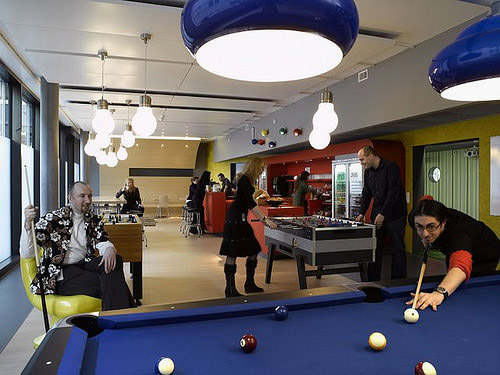
Google's offices in Mountain View have become the stuff of legend now for a lot of developers. The employees take a salary hit for the perks, but the principle is that it leads to higher productivity because the employees are happier and want to stay at work longer. Personally, I think it's a noble idea that Google has become a little too arrogant about, and staying at work for more than 40 hours a week isn't necessarily a good thing. Regardless, I can't argue that their campuses are pretty cool. I think if Amazon dropped that kind of cash on its campus the customers would feel like they weren't getting the best prices on products and a competitor would cut corners to drop their prices even lower, but Google has no such problem with plenty of eyes (for now, at least) on their search engine.

The point of all this is really just a pictorial of their offices around their world, which I had no idea there were so many of (I don't know how they operate with so many offices like that, but I'm sure they're good at it). They've definitely got some style, and I think my favorite office is in Zurich:


Most Bank Sites Insecure

A study from the University of Michigan has revealed something that most security experts probably already knew: the majority of websites for banks are not quite secure. A shocking half of the banks observed did not transmit login information over SSL, which means that an eavesdropper could see what you were sending to your bank and while you probably weren't transmitting your user name and password in plaintext it would probably leave you vulnerable to a man-in-the-middle attack or a similar attack since the "bank" doesn't have to verify its identity to you. Another big no-no is redirecting users to outside sites without warning. If you get redirected somewhere while banking online, be very afraid and call your bank's support immediately. Anyway, the study is an interesting read and will probably make you pretty paranoid about checking your bank statements for strange activity. I don't know what a better alternative would be since it seems like no matter how you bank you're susceptible to fraud and identity theft (eavesdropping at a branch, mail tampering, phone taps, etc), but hopefully more banks will ramp up their online security.

Final Notes

Just a couple of quick things before I sign off here. Facebook has re-designed their site and I actually like it. I'm usually pretty hard on them, but this actually shows some understanding of the clutter that the site has been accumulating and takes a stab at organizing things intuitively.

The other thing is that Olympus and Panasonic are working on developing smaller SLRs (the big, high-end cameras that produce excellent quality pictures and are designed for pros) so that more people can use them. I would personally love an SLR, but I'm too used to the convenience of an ultracompact (my PowerShot Digital ELPH).

I'm going to finish watching Black Snake Moan (an excellent movie so far) and hit the sack (I finally got a bedding set!). Have a great week, everyone!

Monday, August 04, 2008

Comcast's Day of Reckoning is Here

PAX

I just wanted to start off the post with some great news: I received by badge for PAX! So it's now a sealed deal. I'll be twittering updates directly from the exhibit hall and I'll probably blog at the end of it about the things I saw that I'm most excited about. I've always wanted to go to E3 so to finally be able to go to what's probably now the largest gaming convention in North America is pretty cool. I really love putting up original content so this will be a fun learning experience for me, too, on that front.

In other slightly notable news, I bought Devil May Cry 4 on Friday and it's definitely like Devil May Cry 3 but much prettier. It may end up being easier, too, we'll see. I'm going to probably be more focused on Metal Gear Solid 4.

One last personal note: I finished reading 'Salem's Lot and I was really impressed by it. I feel like every Stephen King book I read is my favorite King book, but this one really is ;) If you're interested in vampires or horror, this is a must-read. It's actually less about mayhem and more about the characters and how the town copes with the anomalies that start to occur.

A Red Letter Day

If you don't know what Net Neutrality is, I urge you to watch my short film explaining it in laymen terms.

And now for my headline story: August 1, 2008 was a red letter day for the fight over net neutrality. In a shocking ruling, the Kevin Martin's FCC ordered Comcast to stop blocking content (they were blocking P2P connections quite regularly in some areas) and publicly disclose how it handles Internet traffic. It's shocking because it's the government telling the people that they're right, and Kevin Martin isn't necessarily known for standing against the industry but I think that Congress was suspicious of this so I guess he's changed his ways. Also, this ruling sets a precedent against blocking Internet traffic and support the FCC's so-called four freedoms.

As you can imagine, some people are excited and some people are really pissed. Comcast and other ISPs have already begun rattling their sabers and are considering litigation. I imagine that they'll question the FCC's authority to pass such a ruling, but they having stated publicly (yet) what legal recourse they have. Time Warner has gone so far though as to say that the ruling will have a "chilling effect" on investors and innovation (funny, they haven't had problem with either before restricting content). Anyway, I'm pretty excited about the decision and look forward to this being the start of a bright future for the Internet, if this trend continues.

One more thing on the FCC: they're proposing a nationwide wireless Internet service with the pornography filtered out. This makes sense coming from a typically conservative FCC, but it definitely steps on the fingers of the first amendment, as some advocacy groups are fighting for. It must be rough fighting for the rights of people who film sex, but any censorship on the Internet could lead to a slippery slope and such access control should be left to parents. I mean what problem would doing this solve? There's Internet not controlled by the government that's not censored, so there's always a way for determined minors to get around it. Also, why are we wasting money on a national broadband service? Why not just promote more competition in ISPs?

Apple Update

Apple has been having some trouble with its MobileMe service. I don't use it myself but users have been abuzz with near daily outages for some users. It's at the point that Jobs is personally overseeing the fixes, probably with a long whip. It amazes me that they would release this sort of service without stress testing it more thoroughly. My guess is that it was triggered by 1G iPhone users upgrading to 2.0, because my brother's update was taking forever. I guess it runs on the same hardware as MobileMe? By the way, if you want your own iPhone but don't want to go to AT&T, then you'll have to wait until at least 2010.

One last bit of Apple news, and this one has been everywhere: they're telling retailers to stock up on their MacBooks and iPods, theoretically in preparation for fresh merchandise. This would mean some sort of drastic change on both lines, but why would it be drastic enough for consumers to not want it? They are expecting lower profits next quarter, so maybe they're just being bear-ish about it? Also, if they expect demand to be so high for the existing lines, why not keep this a secret from the retailers (i.e. the public) and just stock up in their own warehouses? Something is fishy about this...could it be a smoke screen?

Firefox's Market Share Grows

Firefox is going strong with its market share exceeding 20% while Internet Explorer shrinks to below 70%. This is pretty impressive considering that they were under 10% just a few years ago. The Firefox team is also gearing up for version 3.1, which includes visual tab switching (kind of Aero-like) and wildcard searching in your address bar for past URLs. They're minor adjustments, but I'm really looking forward to the latter.

Midori

Microsoft has been working on a project called Midori that is supposedly an alternate OS to Windows. The speculation is that it'll be an Internet-based OS as Microsoft observes the growing trend of virtualization, and if that's true then this is probably the first time in a long time that Microsoft is really thinking ahead of the curve. If we could sell thin clients then even more households could have computers and laptops for less.

Adsense for Games

Google is looking into how to put advertising into games, something that I thought would've already been implemented by now by somebody. They've already developed a technology to insert video ads (probably in "beta", knowing Google), but I personally think that video ads will just alienate customers frustrated with it and wishing they could pay to just get rid of them. Why not do things like product placement, billboards, and other forms of more subtle advertising without having the game characters cop out and say "and now a word from our sponsors!" I could get behind something like that if it significantly reduced the price of a video game or if it made the game free with a paid, ad-free version, but I can't find any more details so hopefully we'll learn more soon.

In other Google News, their Street View (in Google Maps) has been approved for the UK, which isn't too surprising given that the government there already has cameras everywhere to monitor the people, but people have been suing Google in the U.S. without much success. I don't think Street View is all that bad, unless it's regularly updated. One more thing from Google: they've been investing in eco-friendly vehicles, including the awesome 300 MPG Aptera. I think this is kind of straying from their core business a bit much, but I guess diversification isn't a bad thing.

Quick Notes

There's just two more things I wanted to mention. The first is Gizmodo's explanation of every cable you'll probably encounter right now. It has a lot of information you never know you wanted to know, so it's at least worth a glance. The other thing is the best primer to the Linux command line that I've ever seen. If you're scared to touch a Linux machine, then read it and don't be afraid anymore!

Sunday, July 27, 2008

X-Files and My Semi-Glorious Return

I'm back to blogging! I meant to write this post yesterday, but opted for Rock Band instead (sorry). I should be posting at least weekly, but I'll shoot for bi-weekly. I'm still getting adjusted to living in Seattle, and I am a bit homesick, but I am enjoying the scenery out here.

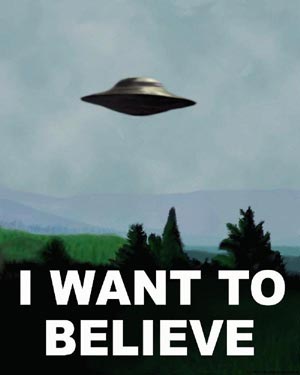
X-Files: I Want to Believe

Full disclosure: I can't remember the last episode of this show that I saw, but it was probably the only one I've seen. This show was on when I was pretty easily scared of stuff in general so I never got into it. I'm sure it was a good show, it just wasn't my cup of tea and now I'm on to bigger and better shows (Burn Notice is currently rocking my socks).

The movie revolves around one big missing persons mystery (an FBI agent) and a psychic, so given the psychic's involvement the FBI have called on Dana Scully to call in Fox Mulder, who requires her to help if he's going to help. They've basically been going on with their own lives (Mulder's being as a recluse) so this is kind of a major reunion for them. The more I think about the story though, the more I have problems with it. I walked out of the theater feeling no better or worse than when I walked in, and the movie seemed pretty good but not amazing.

Let me start out with my issues. They had a psychic helping them and they called in Mulder because they were stuck. Anyone see a problem with that? They have a psychic, which is hard for them to believe naturally, but why does this mean they need to call on Mulder? It seems like he's been estranged by the FBI, so I don't see why they require his help. Even if you're ok with that though, I just never believe the chemistry between Mulder and Scully. Their reunion in the movie seems to have been after a long time and yet they weren't very affected by it. Their love story progression seemed like an after thought they clumsily wove into the movie, which is strange because I had heard in an interview that the movie was supposed to center on them. I also hate that we never connect with the antagonists at all, and the motive involved isn't all that compelling.

I really don't want to believe anymore

I don't know if fans really loved this movie. It seemed to drag on a bit. There wasn't a whole lot of thrill moments or action, and I never really got pulled in. Granted, I had no investment in this series and only went to see this movie in the first place because a friend wanted to, but I figured that it would be good. It could be that I'm dealing with a hangover from The Dark Knight and any movie I see will pale in comparison, but I watched Ratatouille the other night and still managed to enjoy it.

I definitely wouldn't say that the movie is bad though. I think it could've explained things better and tightening itself up a bit on time, but it was still entertaining. I think you should rent it if you're at all intrigued by the series or murder mysteries. It's definitely nothing out of the ordinary though (if you really want a great murder mystery just go rent Mystic River), and there are certainly better movies out there right now (obviously The Dark Knight, but I loved Wall-E and I've seen good reviews for Mamma Mia and Step Brothers). I give this movie a C-, because I can tell that they were trying to reach out to fans rather than people's wallets, but I think that they've probably just run out of ideas. It probably would've benefited from not being released right in the middle of a competitive summer for films.

The Dark Knight's $300m Dash

I counted on Box Office Mojo that The Dark Knight had topped 23 of their charts including biggest opening weekend ever, biggest second weekend ever, and biggest opening day gross. The one everyone is focusing on now though is that it is the fastest movie to hit $300 million (it's already at $315 million domestically, but over $350 million worldwide) with a record of 10 days. The third Pirates of the Caribbean movie had the title before at 16 days, and now people are predicting that The Dark Knight may beat Titanic's $600 million record for biggest total gross. I think that it can probably pull it off since it is past halfway there in its 2nd weekend. By the way, how the Hell did that movie make so much money? It wasn't a bad movie, but I saw it once and never want to see it again because it was so heavy and depressing. Anyway, this movie deserves the massive amount of money they're making. It seriously is a good time to be a nerd when something this phenomenal comes out that literally must seem like to many people, including myself, that it's straight out of their childhood fantasies. (I wasn't that dark as a child, but darkness always intrigued me)

Up-marketing Vista

In case you haven't noticed, Windows Vista has been taking a beating as far as publicity goes ever since its released because it didn't deliver on several of the promises that was made of it early in its development (always a fatal mistake). It took Microsoft far too long, but they're finally gearing up some positive marketing for Vista. They tested the waters by showing a "new OS" to people called Mojave and seeing how they liked it. In the end, it turned out that Mojave was Vista with the "Vista" name stripped from it and people were pretty shocked because most (or all) of them had the impression that Vista sucked. I'm personally glad about this because I'm freaking tired of having to defend my computer: it's a great machine and Vista works very well on it. It is no worse than XP and I admit that it sucks that you need a good computer to run it but if you do then the extra features (including the massively re-vamped search functionality) are pretty cool. The only problem I've had is that my downloading can sometimes impact my computer's overall performance, but I don't think that's necessarily Vista.

That's just one component for their response to Apple's smarmy Mac vs. PC ads. They're not going to do the same thing in reverse to attack Apple, but they're going to stop being such a sleepy giant and try a pro-Vista message. Some have seen the ads and are already excited about it, but they have not yet been made public. For the record: I don't hate Apple or Microsoft, but I do hate Apple taking advantage of its underdog status to continually take low-blows at Microsoft. Their ads are often unfair and prey on stereotypes, which bothers me. I'll admit that they're clever, but they've gone on far too long.

Open Xbox

One more quick piece of Microsoft news: they've decided to open up the 360 platform! That means that you don't have to be a big studio to write your own Xbox 360 game and put it out on Live. Not everyone will be allowed to put their game on Live, but the fact that they're encouraging this is just a massive step in the right direction. I wish that Sony would do the same. It's just going to breed more competition and produce higher quality of games that rely more on just flashy graphics and big budgets to attract attentions.

Yahoo! Music Store Folds

In another giant stab to DRM, Yahoo has closed up shop in the digital music game. They are the second DRM music service to go down this year (MSN was first), but the difference is that in a couple of months their key servers are going offline! What does that mean? The what DRM music often works is that they're locked by a key (in the case of subscription based services, these keys usually need to be renewed monthly) and you need these keys to be able to open these tracks. If you transfer them to another computer, this computer asks the server for the appropriate keys using your login information and it obliges, but in Yahoo's case you can't move your songs to another computer so if your computer dies then so does your music. Lame, huh? That's why you should use Amazon MP3: I still personally thing that it's the best digital music around and something like this would never happen to its customers. I wonder if enough people used the service for this to impact Yahoo's image? I kind of hope so, because it's a pretty raw deal (MSN's key servers will only be up until 2011, so they're not much better).

Comments and CS Concepts

I just wanted to briefly mention a couple of articles that I liked. The first one is concise and talks about why comments in code are appropriate and why. It's a great read, even if you do use comments in your code.

The other one is a list of the top 10 concepts that all software engineers should know. With the exception maybe of layering, I think that your success in the IT industry is doomed without an understanding of these ideas and a willingness to flesh them out throughout your career.

Streaming Torrents

EZTV, a huge group for trafficking torrents, has started putting up content that can be streamed using Swarmplayer, which streams content using bittorrent technology to distribute it. This is an excellent idea and I think could seriously revolutionize how we stream multimedia online, if it's harnessed in legal uses. This would really cut a lot of overhead out of putting things like TV shows online because a media company would no longer need to keep them on a centralized server and pay for the bandwidth to deliver it but rather could just seed a show well (i.e. have a few powerful machines dedicated to serving up the shows) and let everyone watching the show upload the show to others as they watch it. Couldn't someone compete with Hulu if they harnessed this technology? I imagine that you could put out HD-quality content with this sort of infrastructure. Only time will tell (assuming that this technology does get picked up by someone big).

One-Liners

I have a couple more articles that I want to talk about but they're just one-liners:

Legendary hacker Kevin Mitnick was part of a panel recently at a hacking convention and told some great stories (including a live prank). He's probably the father of social engineering attacks (tricking you into giving up sensitive information or making yourself vulnerable).

CNN has a pretty good article on how to prepare yourself for the transition to digital TV. If you're on cable or satellite, then you're ok. Otherwise, read that article.

Rock Band

I just wanted to conclude by proclaiming that Rock Band is an incredible video game. As expensive as my 80 GB PS3 was, I'm really glad I got it. I'm excited to start buying Blu-ray movies (especially Iron Man and The Dark Knight), Metal Gear Solid 4 is beautiful, the Playstation Network store is just how things should've been on the PS2, and Rock Band is by far one of the coolest games I've played.

I never thought I'd like it that much because I never got into Guitar Hero, but it's definitely worth checking out. The closest any game has come to replicating the kind of co-operative play you get from this game is probably Wii Sports, but this game tops that. You really do feel like you're part of a band because when you play hard song it's rewarding and you start patting each other on the back and stuff. Also impressives are the nuances: the presentation is flawless. They had my band name (Elton and the Fun King Band) on a tour bus, on CD album covers, and in neon in the World Tour mode! Plus, the load screens are customized with your band! Any musicians will really be impressed with this game (or non-musicians), because I think that it handles guitar a lot better, as well.

*deep breath* Ok, enough of that. I'm going to go read Salem's Lot for a bit. Have a great week, everyone!

Saturday, July 19, 2008

The Dark Knight

Hiatus is Ending

I've been on hiatus for quite a while now, but it's almost over! I've spent the last week getting moved into my apartment and I'm quite pleased with how it has turned out. The furniture is classy but not really expensive, I love having my new HD TV, this DVR thing is ridiculous (especially with HBO + Showtime), and I'm having a lot of fun with my PS3 + Rock Band (especially while my brother and sister-in-law are here). I start work on Monday (finally) so I'll be back into a routine by Wednesday. By then I'll be much more homesick though with all my family gone (even my cousin who lives here and her family are out of the country). By the end of next week you should start to get back your regular dose of tech news with probably a dribble of some other stuff (we'll see).

The Dark Knight

I'm going to be keeping this spoiler-free, so don't be afraid to keep reading. I hate it when reviewers give away key plot details, it really hurts the movie experience. Speaking of which: you need to see this movie in IMAX if it all possible. It's worth the extra few bucks, trust me. Christopher Nolan shot 6 scenes in the movie using IMAX cameras, and it shows.

In case you've been living under a rock: this movie is a direct sequel to Batman Begins and is not at all related to the prior Batman films. The main premise is that the organized crime in Gotham, under siege from Batman, turn to The Joker for help and, naturally, chaos ensues. This movie is hands-down the best comic book movie ever made. It took my high expectations and just shattered them. This movie doesn't just blow away Iron Man, it really outshines Batman Begins in its dialogue, pacing, and action scenes. This is Batman the way it was meant to be experienced and really combines the elements that make Batman my favorite comic book/animated series.


There's so much to love about this movie that I'm not sure where I should start. I think I'll go with the acting: Heath Ledger steals the show as Joker among an already incredible cast. He doesn't just portray the Joker, but for 2 and a half hours he is the Joker. I can't think of the last time I saw an actor nail a role so well that I couldn't even believe it was them in the role. I'm not saying I thought he was a bad actor before, but just the voice and makeup and everything transforms him into a completely different person. He's so good that I'm sure Jack Nicholson will see it and say, "Damn, he was good!" If you go to this movie for no other reason it should be to see Ledger in his best role ever. It's so sad to know that he can't come back in a future Batman film or any film at all. If you ever doubted his abilities as an actor, this movie will embarrass you.

The rest of the cast doesn't disappoint either. Christian Bale is an even better Bruce Wayne than before and really takes on a darker, grittier Batman. This movie is really dark, and Bale doesn't shy away from this. Michael Caine is, well, Alfred. he was in the first movie and he is here also. If you've seen the first one (which you really should before walking into this one) then you know what to expect here. Maggie Gyllenhaal really steals Rachel Dawes from Katie Holmes because it will amaze you that Katie Holmes ever could have been Rachel Dawes. I always felt that Gyllenhaal was underrated and it shows in this film. Aaron Eckhart was the perfect man to play Harvey Dent. The concept of a DA with a passion for justice is not lost on Eckhart. He starts off as being not bad and then progressively just gets deeper and deeper into the role. Morgan Freeman's character is given more screen time in this one and while I would've loved to have seen his character fleshed out a little more I appreciate their time restrictions also.

Speaking of which: the worst thing you can drudge up about this movie is how dense it is. It's 2 and a half hours long and a lot happens, but I feel like it's paced well enough so that you'll always want to know what happens next and you can't possibly be bored. You probably will laugh, cry, and jump in your seat (or squirm) during this movie, it's just that powerful. I love the dark humor because I love dark humor in general, and the delivery is always impeccable. The dialogue in this movie is decidedly more mature when compared to its predecessor, which I think is saying a lot (probably because David Goyer was not a part of writing this one). Getting back to my point though: there are several plots throughout this movie that do all tie together but can get confusing if you don't pay attention. Of course, I just look at this as giving more re-watch value to the film. There's so many little details to appreciate and the cinematography is so spot-on that you can't help but want to watch certain scenes again and again. The special effects are never too heavy and are always just welcome inclusions.

This movie should not be seen by small children. Seriously, if you're under 14 then you have no business seeing this movie. It's not curse words or violence (though there's not much cursing and there's absolutely no nudity), but rather the themes that this movie revolves around. They're dark, complicated, and involve a lot of moral gray area. Besides, the Joker would probably seriously creep out anyone that young (I'd be surprise if he didn't give some adults bad dreams). The haunting imagery in this movie will likely stick with you, but you have to appreciate the fact that these characters are likely to stick with you. You really care about them and feel involved in their lives.

I give this movie an A+ with my highest recommendation for you to run out and see it right now. Please, go see it in IMAX if you can. If you are above the age of 16 and you do not see this movie then something is wrong with you. Yes, it's that good. Even my dad really enjoyed it.

Saturday, July 12, 2008

Get Smart and Wall-E

Sorry it's been a while, but my life has just been so extremely busy lately. After my vacation in Austin I had to pack up everything for Seattle and now I'm here trying to get my apartment together. I love the apartment and, of course, the city, but I do miss home. I'll get back to my normal mix of tech news in another week or so. Until then, enjoy a couple of movie reviews!

Get Smart

I don't know how I should feel about Get Smart. When I saw it, I actually really did like it, but then the reviews I read kind of made me think twice.

I had no familiarity with the TV series that the movie was based off of before walking into the theater, but the Alamo Drafthouse ran a few clips from the show before the movie started (which I thought was pretty neat) and the movie did seem to keep in theme with the show. However, some fans of the show have said otherwise. In any case, the movie was not what I was expected: I thought it'd be a dumb spy movie like Naked Guy where the protagonist is just dumb but it's really one where the protagonist is smart but really clumsy. The basic premise is that Control, this spy agency, has had some leaks so Steve Carell has to become a special agent and works alongside Anne Hathaway on a case.

I personally thought that the movie was hilarious. The jokes weren't always fresh, but I thought that the delivery on them were great. Steve Carell is great at being dorky but lovable and Anne Hathaway at times is good at being graceful and sexy. Of course, Alan Arkin was awesome because he's Alan Arkin, but I really wasn't impressed with the Rock (I've actually seen movies where I've liked his acting). My friends and I were laughing the entire time, but the criticisms that I've heard but didn't personally have are good ones: the technical shooting quality was subpar, the jokes have mostly been done before, and it did try really hard to be a serious action movie. I think it wanted to be a funnier True Lies but it missed the mark on that count.

The bottom line is that this movie is not for everyone. That's kind of a disclaimer with all comedies though, they appeal to certain people more than others. I went and saw it because some of the people I was following on Twitter enjoyed it and my friend really wanted to see it. In the end, I was definitely entertained, so I give it a B-. If you're not sure about seeing it, then just wait for it to come out on video and try it then. If you want a comedy though, try Wall-E first.

Wall-E

Has Pixar ever made a bad movie? Granted, I haven't seen all of them but I haven't heard of Cars being bad either. To continue the pattern, Wall-E is probably the cutest movie that I've ever seen. There's so much to love about it for all ages. From the short that precedes it to the end credits, it's truly a visual feast.

The premise is that Wall-E is the last robot in his line to be left on Earth cleaning it up while all the humans are away. He becomes very curious and self-aware over time, and then one day a foreign robot comes to Earth and launches us into the rest of the movie.

What's really interesting about this movie is how little dialogue it incorporates. So much of the movie tells the story by the actions of these robots and, while there is dialogue, there's so little talking (other than what's computer-generated) that you forget that there was any at all! It's just a testament to how great the animation is. There are no words for the visual quality of the movie: it's technically brilliant and they utilize it so well to tell a haunting, yet endearing story. The movie actually kind of reminds me of Idiocracy and I, Robot, but it definitely paints robots in a better light than most movies tend to. It's by no means strictly a children's movie: I can't imagine anyone walking in and not having a good time. It's cute, funny, and just interesting overall.

The only criticism I have for this movie is hard for me to explain, but it does have to deal with the movie crossing the boundary between the cartoon world and the real world. Other than that, I really enjoyed the voice acting and the story overall. I give it an A and will definitely be buying it when it comes out.

Thursday, July 03, 2008

How to Secure Your Machine (for free!)

I've had this in my head for over a month now, but I wanted to wait until after the trip to write it all out (and there was a lot to write!). A lot of people don't take security on their home machine under much consideration because, frankly, they were never educated much about it. Why would we be? To be honest, even I didn't really understand what was necessary and why until I took a class on network security last year. I'm going to try to hit all the basics of the minimum you need to use your machine with little chance of bricking it, losing all your stuff, or, even worse, losing your sensitive information. If anything is unclear, feel free to comment. If you catch me saying something incorrect, please also comment so I can correct it; there's a lot here for me to keep up with.

I've never tried a full-on original essay like this before so I hope it goes well...

Introduction

There's a tradeoff between security and convenience. The reason that malicious hackers are able to have so much fun is usually just laziness. Most victims simply just don't do enough to protect themselves because it's human nature to try and enjoy conveniences. That's why 1-click shopping is popular on Amazon and iPods are still selling like hotcakes even though there are competing mp3 players that do more. It's amazing how often a simple password list will work (consists of password, password123, the user's name, etc.) because it's inconvenient to come up with one of random letters, numbers, and symbols. People ignore security patch updates and that's the way a lot of attacks succeed way past the vulnerability has been discovered. Programmers are sometimes sloppy and allow for buffer overflow attacks, which is probably the most commonly exploited vulnerability class. In essence, if you want a machine built like a tank then you're going to have to sacrifice some conveniences, so that will be a recurring theme in this article.

The reason for this tradeoff in convenience is this arms race we have in computer security. When we came out with anti-virus software, they came out with polymorphic viruses that change themselves constantly (like real-life viruses can, I believe?) to make detection harder. So, scanning just isn't enough we also have to be responsible about how we use the computer. Also, there's intrusion detection systems (IDS) (something I did research in last semester), but they rely on looking for anomalous behavior. The question is, how does it know what anomalous behavior is? They still need our help to keep out intruders.

What you have to realize though, nonetheless, is that each one of the following recommendations is an important pillar in your machine's safety as well as that of the information that passes through. Hence, I highly recommend doing all of the following things. Fortunately, you can do these things without buying any fancy software. The only place you'll need to spend money is in my first tip.

Back it up!

Any successful large company understands the merits of mastering disaster recovery. Average people, however, aren't quite so reliable. It's almost as if we think we're invincible, believing that the stories on the news about some widespread virus or worm only happen to idiots. In reality though, the most important tool in your security arsenal is keeping at least one backup of all the programs and files that are most important to you. After all, iTunes won't send you your library again if your hard drive dies. As careful as any of us can be, shit happens. Just accept it and move on with your life. They say you should live your life as if each day is your last. I say the same about your computer: use it as if when you wake up in the morning it won't be there anymore. The attacks and hardware problems that can occur are too numerous to be listed.

Ok, so enough of my soapbox, what do you need to do? First thing is first: you need a backup medium. There are some online services that promise sync your hard drive while your asleep and keep your data somewhere in the clouds (i.e. on a server somewhere far away). I've blogged about some lists of free ones here and here. I've started using Dropbox lately and I really dig it for its simplicity. The premium services are a bit pricey, but usually worthwhile. The reason you'd want to backup online is that if you have a hard backup somewhere in your apartment and your computer is in your apartment then what if your neighbor has a bad day and burns down the building while you're at work?

Barring the natural disaster or physical theft scenarios, keeping a hard backup is a great option and a necessity at an absolute minimum. The advantages are that hard drives and optical media are quite inexpensive, you have complete control over it, it offers you a way to take your files with you without having to lug your computer with you, it protects you from malicious attacks since you can always just format your computer and start fresh from the backup, and it protects you from hardware failures in your computer (i.e. dead hard drive, worn out power supply, etc.) for the same reason. They have some pretty physically small external hard drives out there now for $100 or less, or some bigger ones for the same price but double the capacity. Look for a name brand, read the reviews to make sure people have good experiences overall, and just order one. You need one at least as big as your hard drive, even if you don't backup all your data on it.

Most hard drives will come with free software for back-up right out of the box, but if you decide to use a USB flash drive or optical media (i.e. CDs or DVDs) then you'll need to take to the Internet. I had to do this because Retrospect on my Western Digital doesn't work on Vista. After using several different ones, I liked Karen's Replicator the best. You just setup jobs to copy folders to where ever you want and then set them to run automatically while you're asleep at whatever frequency you want. It does progressive backups, so after the first backup it'll only handle changes rather than re-copying all your data every night and wearing out your backup hard drive faster than necessary. It's not as convenient to do automatic backups on optical media, but they can still be used. A competitor to Karen's Replicator that may be better for optical media is WinBackup. Both of these programs are kind of quick and dirty and don't give you all the features you may want, like taking an image of your entire hard drive. You can always shop around for the paid software that does everything you want, like maybe Genie, which makes it really easy to back up your registry and e-mails and all that.

Oh, and most companies already secretly backup your work machines so consult your IT department on that or ask them for the means to backup your work computer(s). If they don't oblige then you should definitely raise Hell about it.

Spyware: The Silent Killer

If you don't know what the word 'spyware' means, then you probably do but just don't realize it. It's used as an umbrella to refer to software that either intercepts what you do on your computer (i.e. sites you go to so that an advertiser knows what your interests are) or partially takes over your computer without you knowing. It's often just annoying, but there is a security risk in that it could steal sensitive information, as well. It can also install 3rd party software on your computer to the point that your computer is near unusable due to having its resources bogged down. Some tell-tale symptoms are that your computer runs slower than usual, you see windows pop up out of nowhere, browsing the Internet takes much longer than usual, when you go to the task manager you see processes that probably shouldn't be there, and changes are made to your registry that you didn't make.

Side note: You know how Vista always asks you if you want to allow a program to be opened after you just double-clicked it and you think the OS must be retarded? Well, I think it does that because spyware could open software it installs without your telling it to, but if Vista forces the decision to go to you then it's less likely to work. Anyway, you can disable this if it becomes too prohibitive; I don't think you necessarily need it at its default setting.

There are two programs that I think are absolutely necessary in fighting the war on spyware, and both of them are 100% free. The first is Spybot Search & Destroy (they must love that name). Spybot is really three tools in once. My favorite is called TeaTimer, which asks you to approve any changes made to the system registry (which is just a repository for Windows settings and data). This is important because a lot of times spyware manages to install junk on your computer by modifying you registry to tell Windows to do stuff when it restarts (a lot of software you install will make changes to the registry for routine tasks like clean-up or making some changes that it can only make before Windows boots and such). It will also warn you when processes that look suspicious try to run. It isn't as annoying as it sounds, and will give you piece of mind. The second piece of Spybot that's great is immunization, which is basically a preventive measure (much like getting inoculation shots in real life) to keep things like tracing cookies at bay. This will protect your privacy and help keep out nasty spyware. The final piece is its scanning, which I recommend you run regularly (at least weekly). Unfortunately, there's no way to set up a schedule for it to update itself or scan your computer, so be sure to do both regularly. If you don't update it, then you're probably vulnerable to the latest, hottest spyware out there (which is the stuff you're most likely to get).

The other free, great tool is Ad-Aware. It's a great second-tier defense, it doubles as an anti-virus program (paid version), and it's highly respected. If you pay for it, you get some great benefits: scanning on a schedule, real-time protection, a process monitor, and more. It's worth the money if you have it to spare and like the software. Otherwise, just run a scan in Ad-Aware after you run your regular SpyBot scan; it's worthwhile even in its free version.

Fighting Viruses (without buying Norton)

Viruses come in all shapes and sizes. The term 'computer virus' generally refers to malicious code that hides in legitimate applications but can only propagate by being physically run by a person (i.e. cannot spread on their own, they need your help). Some viruses are infected documents or files that exploit vulnerabilities in the programs that process them (e.g. bad .doc files that exploit a problem in Word) but infect the entire program once opened, whereas some infect the operating system so that the infected files look normal (like the Sony rootkit fiasco where Sony CDs restricted your ripping the CD or putting the music on certain mp3 players) and others still spread themselves over P2P networks (some media companies put these out on purpose to discourage piracy over P2P). The really bad part about viruses is the rise in polymorphic viruses, which scramble their own code to make them harder for anti-virus software to detect as they spread (technobabble: via encryption with different keys) or self-destruct when you try to run them in an emulator (you would run it in a safe environment to see if the program is infected or not) or debugger (which would help discover how it works). You might even consider Skype a benign polymorphic virus because of its heavy obfuscation and anti-debugging techniques to hide how it works (for security reasons).

Fortunately, there are a few free applications to help protect you from viruses. You don't need to install them all (just your favorite one), but you can if you want. They each use different definition files, but I'm sure there's a lot of overlap. I personally use ClaimWin Free, which is only for Windows (unless you count the ClamAV engine on which it's based) but it's completely free and it's lite. It has a scheduler and everything. The other popular alternative is Avast, which also has a paid version. Unfortunately, it's also only for Windows (or Mac, if you pay) but AVG has a free version and also works on Linux. Lastly, going back to the ClamAV engine, there is ClamXav for Macs.

The problem is that the way that all the programs I just mentioned work is to look for the signature of a virus: like the fingerprints that a criminal may leave behind at the scene of a crime. If we haven't taken that criminal's prints before then how do we catch him when we see his prints? Similarly, these scanners can only look for what they know about, making it hard for them to catch polymorphic viruses and impossible to catch viruses that haven't been discovered yet. In order to catch those you need an intrusion detection system (IDS) that looks for anomalous behavior, which begs the question of what normal behavior looks like. This is a field that is still being researched because we can get 0 false positives (technobabble: using static analysis of the source code in question all alarms are correct) but not 0 false negatives (i.e. some viruses can get away). The reason that you don't see an anti-worm detector is that worms are standalone programs that self-propagate and usually are known as 0-day attacks because they spread so rapidly before they can be discovered and defended against properly (research Slammer, Nimda, Code Red, Storm Worm, or Blaster for more).

What is the point of creating a virus or a worm? Usually, it's for profit. Sending out large amounts of spam is costly, but if you are forced into a botnet (a network of zombies machines that can be surreptitiously issued commands, sometimes encrypted commands, remotely from a master) then you're part of the source of spam. Another purpose of a botnet could be a distributed denial of service attack (DDoS) where lots of machines try to open a connections to a website simultaneously in order to bring it down by overloading its servers, which can be used for extortion. Sometimes it's not for money though. Sometimes it's just for glory and popularity. Make no mistake about it, worms and viruses are on the rise and you need to stay safe. What can you do about worms though without a reliable IDS? Try following the rest of my tips.

Setup a Firewall

I'm sure you've heard this term bounced around a lot and you may think of it as some sort of virtual, impenetrable shield. Well, it's more like a virtual moat: it tries to separate your computer and local network from the big bad Internet. The idea is to restrict not only access from the outside but outbound connections, as well. It should be obvious that you don't want bad guys to get into your machine, but why would you want to restrict connections coming from your machine? For the same reason you don't cough on people when you're sick: if you become a zombie in a botnet then you'll be phoning home to your master for commands (to do bad things to others) and if you have a worm then it'll try to spread itself so we want to keep things like this from happening.

There are several types of firewalls: packet filtering (dumb and stateless, it just examines each data packet you receive individually and follows some set rules without considering other packets), session filtering (packet filtering but in the context of the connection the packets connect to, so some state is involved), and application-level gateways (filtering rules set up by specific applications) are some examples of the more common ones. Some of the reasons why firewalls aren't as powerful as the name may suggest are that they don't prevent insider attacks (I know, that's a low blow), they don't fix the problem I mentioned above of buggy software (which cause big vulnerabilities for attackers to exploit), they don't prevent denial of sevice attacks (hitting a machine or server hard with requests to overwhelm them into breaking down), and misconfiguration woes (more on this in the next paragraph). Also, realize that software that you may install on your computer from a CD that's bad and stuff that doesn't involve connections to/from the Internet are completely unprotected from a firewall.

Still, you should use a firewall because it does help keep your Internet connection tighter so that it's much harder for bad guys to get to you to cause harm and also hard for them to do more damage even if they do get nasty code onto your machine. The most popular solution out there is ZoneAlarm. Aside from keeping out connections that clearly don't make sense, it's famous for its impressive program control functionality: whenever any of your software tries to access the Internet or act as a server, it asks you to approve it. Don't fret, you can set to always approve a certain application that you trust without a shadow of a doubt, but it's such a great idea for you to make sure that a virus isn't hiding out and trying to receive or send data (or receive remote commands). I know it seems annoying, but you'll get used to it and it's definitely a necessary addition to your arsenal.

Use the Right Browser

This is pretty much a no-brainer: Firefox is consistently hailed as the safest browser around and Internet Explorer has historically been the worst, but Microsoft has been making changes to help rectify this. Because it's so popular, Internet Explorer's vulnerabilities are constantly being tracked down and exploited, so it's not entirely their fault. Still, Firefox's vulnerabilities are typically fixed faster and discovered less often, whether or not it has as many as Internet Explorer.

Also, Firefox 3.0 has some great security additions. It provides you with identity information right in the address bar to prevent phishing (where a bad guy designs a site identical to a site like a bank and gets you to input sensitive information that gets sent to the bad guy, but this feature allows you to verify that it's the site you think it is), it actively warns you of forged sites (again, phishing), and it blocks pop-ups (which is an easy route to force malicious code onto you). But wait, there's more! The NoScript add-on is invaluable and a must-have for anyone who browses the web: it blocks all scripts (Java, JavaScript, Flash) by default and punts to you for approval of each domain's scripts permanently or temporarily. This helps pages load faster but, more importantly, scripts that would otherwise load automatically and could do serious damage now don't and so if you click a link on accident or something like that then you're safe! Think of it like a condom for your web browsing: it just works. It keeps the main culprits of web browsing woes, even for sensible Internet users, safely at bay. Plus, you don't get the irritating ads that appear over the article you're reading (though you can get AdBlock Plus for this). I know approving scripts can get tiresome, but after a few weeks you'll be browsing your favorite sites with ease. Oh, and Tools->Clear Private Data is also excellent for maintaining your privacy.

E-mail

Here's a biggie: safe e-mail usage. You don't need software for this, you just need to use your head. You could use Gmail though, which has 2 great features: you can read the start of your e-mails before opening them to see if it's gibberish or important and it won't load images until you tell it to (yes, images can carry malicious code).

When you download attachments, I'd say you should always scan them (ClaimWin adds an option to your shell menu for when you right-click on files) before you open them. Even if it comes from a trusted source, you never know (maybe they've been compromised, like in a vampire movie).

Whenever you click a link, always always always mouseover the link and look into your status bar to check that the URL matches the text you're clicking on or where it should be going (e.g. www.paepal.com is not the same as www.paypal.com). If you know that a site uses https (this means it has a Secure Socket Layer (SSL) to prevent eavesdropping), then the URL the e-mail takes you to should also start with https and not http. However, https does not mean you can trust a given site! Anyone can set up SSL for their site, if they pay for it, to secure your transmissions, but if you're using SSL to talk to a bad guy then it just means that no one can see what you're sending to the bad guy except for them. If someone wants you to go to a fake site that involves you spending or managing your money, they're going to do a great job of replicating it and pick a URL that looks just like it should except for a couple of letters. They may even write a URL in the e-mail that you can click on that ends up going somewhere else altogether! Check the URLs you click even when you're browsing the Web normally though with a simple mouseover.


Watch out for spam! Mark spam as you see it in your favorite e-mail client and don't bother reading it. If, for whatever reason, it happens to be an ad that's tempting and you think may be from a trusted source, then research the URL it suggests before you click on it. Just do a simple Google search, or do a simple DNS lookup/whois (i.e. check that the URL domain belongs to someone legitimate). It's honestly just that simple. People are lazy and don't do this so many fall for scams and phishing attacks.

In general, don't read e-mails that you don't expect. That's a pretty good policy to follow.

Don't Forget Security Patches!

Keep your system patched! Don't you have to get your kids the proper shots before they go to school? And don't your pets have to get their shots, too, before you take them home? So why not give your computer the same treatment? You must install any security updates that your OS pushes out as well as your browser, anti-virus software, anti-spyware software, or your firewall, or else they're useless. That's just at a minimum: you should really be patching anything you use. Some pretty big outbreaks have come out of unpatched software, like Code Red I, which hit unpatched copies of Microsoft's IIS Server software. From sifting through hundreds of vulnerability descriptions in my research in the NVD I can safely say that not keeping some of your simplest software updated can completely compromise your entire computer. Don't avoid updates because they require restarts or something like that, just take the 5 minutes to do it! You'd be surprised how severe the consequences can be if someone takes advantage of your procrastination.

Passwords

This is more of a general tip that doesn't require much explanation: you need to have good passwords for anything that matters to you. What's a good password? It can't be a dictionary word and should be hard to guess based on any information about you that's publicly available. So if my password was "eltoneptiger" then I'd be kind of dense. The best password crackers in the world rely first on creating passwords from what they know about you, then try common passwords (like "password") and default passwords, and then they try dictionary words. The best way to thwart them are random combinations of letters (upper and lower case), numbers, and symbols. Of course, if it's random how do you remember it? Just try to come up with a story that is abbreviated by the characters in your password or similar mnemonic devices. You can start here.

Please do me a favor: when given a default password, always change it. Kevin Mitnick likes to tell a story of how a bank was robbed because of a router using its default password. There's an attack called drive-by pharming where if you don't change the default password on your router an attacker could use an invisible Javascript script to reconfigure your router so that putting in things like "www.wamu.com" will take you to their fake WAMU site so that you can hand over your password. The scary part of that attack is that you wouldn't know you had been victimized because the URL would probably look alright (your router is supposed to look up the URL domain using a Domain Name System (DNS) server, but if it's corrupted then it may not do this properly). (Note: if you used NoScript then I think you'd be safe from this attack)

If you want to protect your CPU, you can change your computer's password in its BIOS so that if your computer gets stolen the CPU is useless. I personally don't do this, but it's not a bad idea. You should also have a password to run your OS and make the screensaver ask for a password when you resume usage. Always lock your computer when you walk away from it when around other people so that it asks for this password, and make it a good one so that it can't be cracked.

Quick tangent from passwords: be sure to encrypt your important data so that it's useless even if stolen. Software like Microsoft OneNote and Excel have this functionality built-in, but there's plenty of other software (like Notepad++) that can do this.

Conclusion

I know I've given you a lot to swallow and following all of them still doesn't guarantee that you're 100% safe, but it means that you're better protected that 90% of people out there so it'd be pretty hard for you to run into issues. Since I've started following them over the past several years I haven't had a single security breach. The key is not necessarily to be scared, but to be vigilant and use common sense.

Have a great 4th of July weekend everyone! I head to Seattle early Monday morning to arrive on Wednesday night, but I'll do my best to squeeze out another post before then including reviews of Wall-E (A+) and Get Smart (B+/A-).

Monday, June 23, 2008

Day 34: Goodbye, Europe! (My Survival Tips)

First of all, this is the last in my series of posts on Europe. I will be back to techie stuff after this one. I thank you all for indulging me; I always love creating original content so I definitely enjoyed putting up pictures that weren't of me (mostly) but helped give people a flavor of these various, beautiful cities. I don't do very many series (the last one I did may have been for ACL in 2006), so this was always quite unique. The next post I write will be about securing your system, and then after that I'll go back to tech news coverage. I imagine my next post to be out by Thursday, and then I'll start with the tech news again probably next Tuesday or Wednesday. I'm hoping that in the midst of trying to move in to my new place in Seattle I can still get back to at least a weekly schedule and hopefully biweekly after I'm settled in.

I have a couple of pictures to share with you, but if you want to see more then just scroll down below this post and you'll see over a hundred of my favorites from the past 33 days.

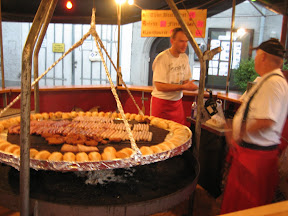
We went to the International Street Festival in Sindelfingen on Saturday, which is the suburb of Stuttgart that my cousin lives in, and it was great! It's the only street festival Sindelfingen has all year, but various places around Germany have similar ones throughout the summer and people just drive to them on the weekends and enjoy them. It had a lot of great food and live music. I had some great spatzle with vegetables, a kabob stick holding bananas and strawberries coated in dark chocolate, pizza with bacon and potatoes, and a brat. What I didn't know about the brats is that this is how they cook them:


Isn't that interesting? It reminds me kind of how Mongolians grill their food. It's just a bit circular plate on an open fire. It was very delicious. The other picture I have to share is my cousin's cherry tree:


Apparently, when this type of cherry is black then it's ready to eat, and these are already quite sweet as they turn a dark maroon. It's amazing how well things seem to grow here, or maybe more people have green thumbs. I've probably seen more roses in Europe during this trip than in my entire life because they have these bushes with literally hundreds of rose buds and other types of flowers and greenery plus apple and cherry trees like that one.

Anyway, onto the tips. Over the trip I learned a lot of random stuff about Europe that I didn't know before. I'm going to list them here just in the order that they appear in my head, and some will apply to all of Europe whereas some will be for certain places (I'll specify this where necessary). I hope you find this interesting and informative, or else I encourage you to put up your own list ;)

  • Do your homework. Be smart: plan out your trip in advance. Get travel books so you can read up on where you're going and figure out what you want to do. The Frommer's series is excellent for a general look at not only hot spots but stuff that's off the beaten path. It has restaurant and hotel recommendations and maps, as well, but the maps usually aren't too detailed. It reads like you're talking to a friend so they're definitely fun to read. If you get a big one like Europe, note that it'll focus on big cities. If you want to check out small towns in Germany, get one on Germany (but the Europe one has Romantic Road stops as well). Also, their 3 star rating system is great: if a sight has 3 stars then you should almost definitely check it out. Another great series is the Eyewitness Travel Guides. They literally double as museum guides/maps. They're full of not only key maps and subway/bus maps but up close hand-drawn maps for neighborhoods and plazas and such pointing out interesting things. It pointed out a lot of stuff in Italy that I totally would not have noticed otherwise.

  • Europe is expensive. Make no mistake about it, most things cost more here than in the U.S.. The exceptions are beer in places like Germany and wine and cheese in some places (namely, Italy and France). The euro is stronger than the dollar and the current rate is above 1.6 dollars for a euro. Even quick, takeaway meals (you buy the food and take it with you rather than sitting there and eating) will run you 5 euros. A good meal will probably run you more like 12-15 euro when you include drink. Hotels are crazy expensive, and it ran us like $150 a night on average for a room for 3 at 2.5/3 star places. And these places are more like a 2/2.5 star in the US. Why are prices so high? Sometimes its just normal market forces, but sometimes its the extreme unionization of Europe. So when you're paying 13.50 euro to see the palace at Versailles, understand that part of the high price is paying high wages (in Germany they have 30 hour workweeks and like 7 weeks paid vacation every year).

  • Bring change to the restroom. Many toilets you encounter are not free, even at restaurants (including McDonald's). If you see a sign about it or a person sitting outside the toilet or a towel boy/girl, then you have to pay 0.30-0.50 euro. I know, it's ridiculous because we're used to them being free, but a lot of times restaurant restrooms are free if you eat there so you may want to run in a cafe and get a cheap drink if you need to use the restroom. Oh, and in Paris, you can use the Louvre restroom for free without buying a ticket, you just have to go through security.

  • Water is usually not free. Most americans are used to drinking tap water when they go to a restaurant, but Europeans don't drink tap water even though it's typically potable. You'd be smart to buy a couple of cheap bottles at a grocery story (it can be like 0.30 euro for a huge bottle) and carry it in a backpack with you, very few places disallow water bottles (for us, only the Uffizi did, and they didn't check our bag for it). In some places, especially Rome, you will find fountains just on the street that look really old but are still functioning and in Rome they actually produce fresh spring water. Keep an eye out for those because restrooms do not come with water fountains.

  • Watch your pockets in crowded areas. In places like Paris, Rome, Florence, and Berlin, pickpockets are common. You don't have to worry about it in smaller cities and towns and stuff, but the big tourist cities that are fraught with crowds are often also fraught with petty thieves. In a way, it's nice that petty crime is a bigger issue than violent crime because the opposite is true in the U.S.. Anyway, keep your wallets in your front pocket (guys) and watch your purses (ladies) because thieves will slit the bottom of your purse. I recommend keeping most of your money in a money belt around your stomach and keeping very little on hand. In the worst case, you can run to a restroom to pull out more money from it if you run out in your wallet. If you think that you're too careful to have your wallet stolen, you need to realize that these people are professionals. I would just keep my hand in my pocket when I was on a crowded bus or subway and that worked pretty well. One guy picked my dad's pocket that had trash in it and then grabbed my wallet pocket on the outside while pretending to fall over onto me, and he knew we figured him out so he scurried off the bus. We should've known he was bad news though when he pushed a lady holding a baby to get a seat on the bus so he could better do his work.

  • Be vigilant of scams. Again, this is common in places like Rome and Paris that are full of tourists. Sometimes the con artists will look like tourists also, but often time they look seedy. Not to be racist, but a lot of the con artists you see in Paris happen to be Nigerians and a lot of the ones in Rome happened to be Bangladeshi. One scam is to pretend to drop a ring and ask you if it's yours while their team picks your pocket (while you're distracted). Another scam, which we fell for, are non-uniformed people at a ticket machine for the subway "helping" you buy your ticket from a machine using their credit card (and then you pay them cash), but you end up getting a child's subway ticket. Another scam involves them putting string around your wrist to distract you while others pick your pocket. These scams are rarely pulled off by one guy and often involve a group of people.

  • You don't have to tip, but cover may be required. All across Europe, service is included in the price of your meals. In fact, some places even have a cover charge. Why? Because Europeans are people watchers who love to sit at restaurants all day and may just order a cup of coffee. To help cover the cost of them just sitting there on that table, many places will charge a cover, which also helps cover the service charge. So if a restaurant offers takeaway, food may cost more if you sit down rather than take it with you. You only need to tip if service was really exceptional, which for us was very rare. Because...

  • Service is typically not very fast. In countries like Germany and Austria, meals are 1-2 hour affairs. Food doesn't come out very quickly at all. Food comes out quicker in places like Italy and France, but wait staff are often not very attentive so you have to grab them if you need something or want the check because most restaurants will have a couple of people service the entire restaurant since they're salaried employees and that's not cheap. This is good in some ways though because, unlike America, they don't ask you every 5 minutes if everything is ok; you can eat your meal in peace.

  • Be prepared to walk, whatever the climate. Everywhere that we went, we had to walk a lot. This is especially true in places like Paris and Vienna where much of the experience is just walking around and enjoying the architecture and views. In the summer, don't think that it'll always be hot or always be cold. It's been fairly hot here (like 31 degrees celsius) but also pretty cold (as low as 14 degrees celsius), so bring some light jackets with you (and umbrellas), but if you're traveling in the summer it'll probably be hotter more often than not (especially in July/August).

  • A/C is a joke. Most hotels and restaurants do not have a/c, but usually do have heaters. This is not because it's not necessary, but rather because in the places where it gets really hot people are in denial about global warming. It can get quite hot, but people just buy fans and leave their windows open. The problem with A/C is that the law in many places is that you can't set your thermostat to more than 10 degrees below the outside temperature. This means that it's still rather hot inside, and heat rises so the higher you are in a hotel the worse it'll be (though if you're on the top floor you may have ceiling windows, which we had in Vienna). Note that some hotels that have a/c do not have windows that open, so that's a bad deal overall.

  • Check your electronics. The plugs in Europe are different, so you'll have to buy a converter (my cousin had them so I don't know where to buy them, sorry). Before you plug anything in though, make sure that it can handle 220 Volts at 50 Hz, lest you blow a fuse.

  • Internet is not plentiful. Don't expect hotels to give you free wi-fi, you often have to pay for it and many places don't have a computer for you to use so you need your own. The good news is that there are Internet cafes, and I've gotten it for as little as 1.5 euros an hour.

  • Each country has its own keyboard. It's super annoying. But if you're a touch typist like me, then look at the bottom right corner, before the taskbar icons, for the country code (e.g. "DE" for Germany). If you click on it, you can change it to "EN" for the American style keyboard. Obviously your keyboard won't physically change, but all the key mappings will be for an American keyboard. Note that it will only apply the change for the window you're in, so if you have multiple windows open and you click around between them then you'll probably have to change it back to "EN" because it'll default to the host country in the meantime. Ask the cafe owners though if they have an American-style keyboard though, some actually do.

  • Austrian toilets are weird. You can see a video of what it looks like here. It has a raised area above where the water is, kind of like a waterfall I guess, so when you go number two it just sits there on top (not in the water), which stinks up the bathroom for longer than a normal toilet would. Plus, I imagine it'd be problematic if you took a big one. If you know why they design their toilets in this strange way, please comment.

  • Don't touch the fruit. If you see fruit vendors on the street, sometimes they have a "you touch it, you bought it" policy. So just point out the fruit you want and let them touch it. If you touch it and it's too expensive, you're out of luck.

  • Trains are great and usually affordable. Trains between Florence and Pisa were like 10 euros round trip and between Paris and Versailles it was like 5 euros round trip. Even for longer distances though they're typically cheaper than airlines and you get to enjoy a great view. The only problem are the sleeper trains, where it can get cramped and hard to sleep. Be wary of doing a sleeper train, and be aware that they'll probably take your passport if you're going through a non-EU country so that the conductor can hand them over rather than waking you up.

  • The roads are narrow. If you're going to drive in Europe, be wary of the roads being narrow and having twisting turns, especially on mountains. In fact, I'd recommend getting a GPS for the trip. We would've been so screwed without a GPS. Anyway, it'll take a few days to get used to driving in Europe, so just keep that in mind. Plus, in some cities (like Brussells and Paris), it's stupid to drive in unless you've driven in areas like that or Romania or India before.

  • Cops won't pull you over for speeding in Germany. This is part of the legendary autobahn: you can go 100+ mph and no one cares. Just look out for signs warning you of cameras, because they do have that in place in certain areas. Driving in Germany can definitely be fun if you enjoy speeding.

  • Pedestrians often cross the street without looking. You have to always be vigilant of pedestrians. In some places, the cross walk is a striped line in the street that has no signal light so pedestrians have the right of way and it's your job to stop for them.

  • Paris transit shuts down early. By 8:30 PM the buses stop running and by 1:15 AM the subway stops. Some of the RER lines end before that so be sure to not be out past 10PM without a plan of how to get back home.

  • In some places, you have to buy your bus/subway ticket in advance. In the U.S., you can usually just bring change to a bus but in several places in Europe, like Rome and Florence, you have to go to a tabacco (Tabac) shop and get your tickets. They also sell passes, usually, for a whole day or multiple days. The one day passes are usually not for 24 hours, but until the end of the day (for Vienna, oddly, they were for 24 hours).

  • Check with your hotel for maps and restaurants. If you did what we did and go to multiple cities, don't worry too much about buying a map because your hotel should have one. If you're not staying in a hotel there, then you need to pick up a tourist map from a convenience shop somewhere. Also, 9 times out of 10, your hotel concierge knows of a great place to eat nearby, so tap them for that information.

  • Be wary of guided tours. This is not to slam guided tours, but they'll sometimes try tactics like "if you wait in this line it's 2 hours but if you come with me then you can go in right now." They're half correct: most guided tours for museums and palaces and such do get priority entrance, but often lines aren't that long. Same with reservations: you may have to pay 4 euros extra for a museum reservation, but then you lose flexibility because it has a time attached to it. Just plan for an hour to wait in line because most museums won't hae you wait in line longer than that and often the guided tour people exaggerate the wait (especially at St. Peter's Basilica). If you want a guided tour, then that's fine, but they're not cheap and you can't go at your pace until after the tour. I recommend the audioguide unless a guided tour is required (like at Schloss Neuschwanstein).

  • Leave a day for the Louvre. That is, if you go to Paris. It is more than you can possibly see in a day, trust me. Do yourself a favor and get the multimedia guide, too, so that you don't have to shuffle around with a map. It's not all that intuitive where the collections are and the guide has tour routes on it.

  • See the Vatican Museum before St. Peter's Bsilica. That is, if you're in Rome and want to see them. The line for the Basilica goes super fast, but the museum line takes longer. Plus, the museum will take you several hours whereas the Basilica will probably only take you an hour. But when you go to the Basilica, head for the crypt first (it feeds into the church).

  • Yeah, people kiss each other as a greeting. I know in the U.S. it's associated with being stuck up, but usually people here do kiss each other on the cheeks to say 'hi'. Just be aware of that

  • There's a lot of nude art here. Be aware that any art museum you go into is most likely going to have nude art. So if that bothers you, then deal with it or don't go see the amazing, priceless art that Europe has to offer.

  • Take breaks and have fun! The most important thing is to have a good time. Don't plan a marathon trip where you're totally exhausted by the end of it: plan for days where you just laze around in cafes or in a beautiful park. Do what you want to do and not necessarily what people think you should be doing. If you hate sculptures then don't go to the Rhodin museum in Paris, but if you love impressionist art then definitely check out the D'orsay instead.


All in all, I really enjoyed Europe. Having to go with my parents was a bit of a challenge simply because our tastes sometimes collide and I'm more willing to go on long walks or go up hundreds of steps than they are, which is understandable because they're definitely getting pretty old now and need to watch out for their health. I was glad to have the opportunity to get this first look at Europe so that I know what to expect and next time can not only be better prepared but go to places like Rome and Paris and do off-beat things rather than the touristy stuff. I highly recommend going to Europe on a vacation and really just enjoying the easygoing European lifestyle while making some cessions for a few tourist excursions. You don't need to know the language in most places, just go online and look up the important phrases ("Do you speak English", greetings, "thank you", "check please", "how much is this", etc.). Then, learn the languages as you go! It doesn't take long in Germany to realize that "ausfahrt" is exit and that "verboten" means forbidden. Just make sure you look up pronunciations (like 'v' in German is really pronounced like an 'f', and 'ch' in Italian is pronounced like 'k'). Aside from just the language, you just learn a lot about how other people live and I definitely think it makes you, subconsciously, a better person overall because it reduces your level of ignorance. Plus, Europe is gorgeous and unique in the amount of history it has, so really leave some time to take it all in and enjoy yourself!

The next time I post I will be back in the U.S., assuming everything goes to plan. Bye bye!