Sunday, April 17, 2011

Euro Trip 2011

Sorry it's been a while since my last post but I've been busy vacationing! I thought I would blog my favorite photos from the trip since sharing is caring. I picked just 42 of my 400+ snapshots, but I hope you'll enjoy them! By the way, you can click on any picture to enlarge it. I just made them smaller so this page is easier to load.

Dublin

We began our trip in Dublin, which is a charming little city with very nice people. We were pretty jet lagged on the first day, but we found the strength to drink some beer at the Guiness factory. Here's the ingredient that gives Guiness its trademark color and flavor: malted barley.


It was hard getting good pictures from the Gravity Bar at the top, which offered 360 degree views of Dublin, but I did my best.


We were very amused by this T-shirt in the gift shop and were tempted to buy it.


We were able to draw several parallels between Seattle and Dublin, one of which being the oddities of public transit. It looks like Dubliners are as happy with their public transit as we are.


I was advised on the plane ride into Dublin by a nice Irish girl to see the Leprechaun Museum. I thought that this clearly must've been a joke, until we found a pamphlet on the ground outside Dublin Castle as well as this sign on the street (which was pointing the wrong way because a guy turned it, dressed as a leprechaun, and decided to make some money off tourists).


The Liffey!


London

Next up on our trip was London, and our first night I finally had some proper cod and chips at a true neighborhood pub (we were the only tourists there).


The street we stayed on was lined with hotels, but was still very pretty.


We saw the traditional sights (Big Ben, Westminster Abbey, etc), but those are all pretty pedestrian. How about a really pimp hotel instead? (we didn't go inside, but it looked awesome)


The British Library didn't allow pictures inside (though it was a really awesome little museum), but the British Museum did and it was pretty incredible. I loved the entrance design.


Aside from the Rosetta freaking Stone and some really great mummies and stuff, there was plenty of other cool artifacts there.


Tower of London from the Tube station:


Brussels

I'd been to Brussels before (more pictures from Belgium from my last trip here) so I knew there wasn't a ton to do there, but you can't visit Brussels and not get a Belgian Waffle:


We managed to stay pretty close to the main plaza, which had pretty nice views at night.


Paris

I've been to Paris before, as well, and I have pictures from that trip posted here if you're interested. It was still fun going back there though and I saw several things I hadn't seen before, including this tree that I just thought was really beautiful (at the Tuilleries Garden).


We followed the Garden up to the Louvre.


I saw this when we were crossing the Seine and I thought it was really cool because it sounded exactly like the proper Sphinx described in the mythology regarding Oedipus.


We went to the Hotel des Invalides (a Hotel Napolean built for injured soldiers that's now a war museum) and they had a room of really cool models of various towns and cities and such built for military strategy, including a model of the place you may recognize from The Count of Monte Cristo film.


Though I have plenty of Eiffel Tower shots, it was too nice of a day out to not take one more from a different side.


My friends endured my pleas to swing by the Dali Espace in Montmartre and I really enjoyed it - this was my favorite piece that they had on display.


The last time I was at the Arc de Triomphe, they were doing a ceremony so I couldn't get too close to the Tomb of the Unknown Soldier, but I got closer this time.


We saw a pretty decent sized orchestra in the subway one afternoon, and they were really talented. Just not something you see every day!


The last thing we saw in Paris before we left was Notre Dame and it was my first trip to the crypt underneath where they had ruins from Paris that once was, and it was just really neat to see.


Rome

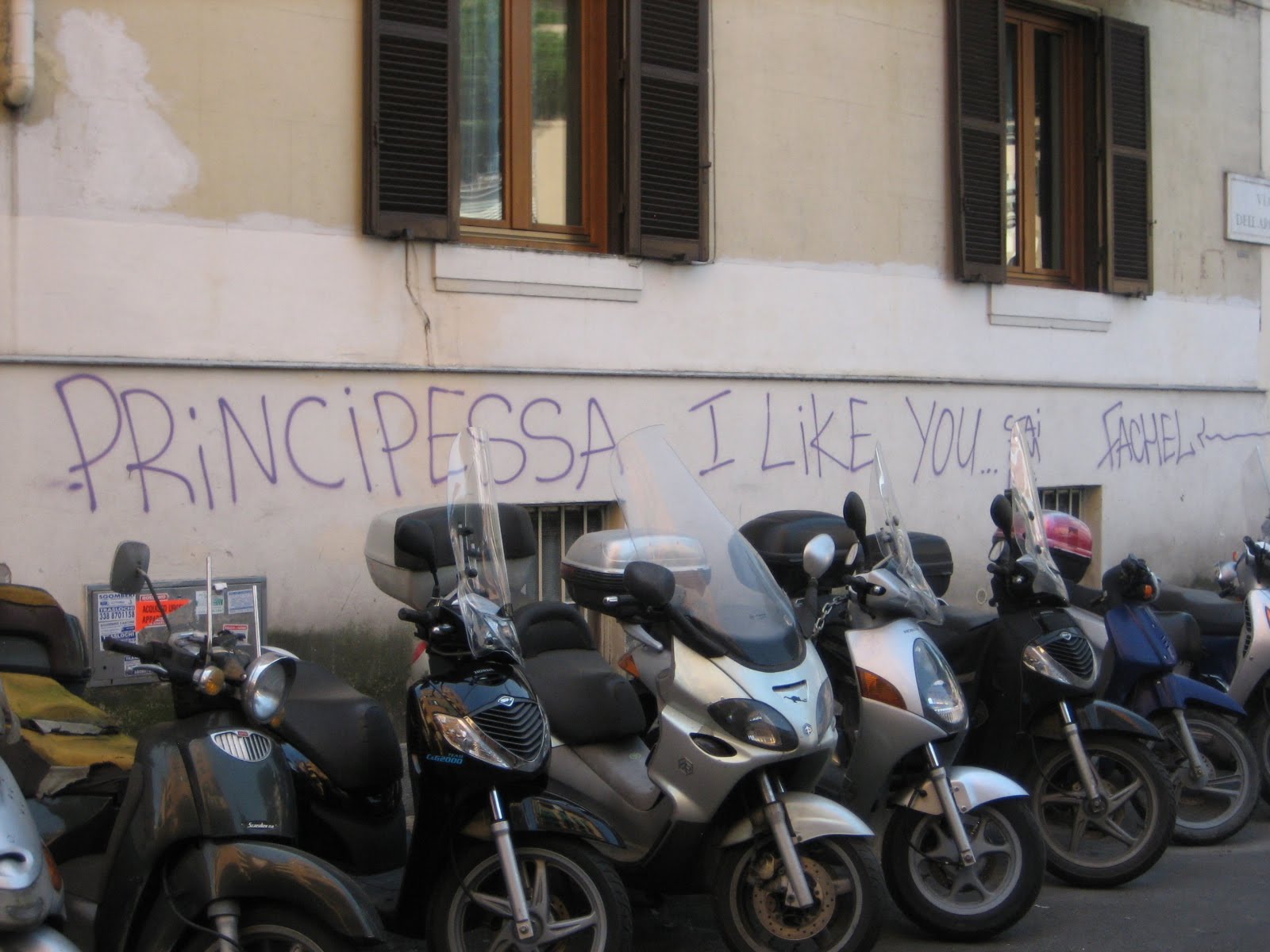
Rome was the last city on our tour, and you can see many pictures from my last trip there highlighting some the big stuff to see there here. We stayed at a pretty good bed and breakfast right in the heart of the area around Vatican City, which gave us a chance to really live like a Roman, and I really took a shine to this particular piece of grafiti because there are so many funny things about it (not the least of which being that he didn't say 'love').

This is the organ at Santa Maria del Popolo, and I just thought it was really pretty how it was designed to look like angels are holding it up.


That church is on one side of the busy Piazza del Popolo, with this being the view from the middle - very symmetrical.


The Borghese Gardens were another new thing I hadn't ventured out to at all on my last trip, and it's basically a smaller version of Central Park. I was really taken aback by the massive trees they had there.


This is just a picture I happened to like that I took at St. Peter's Basilica in the piazza. The lamp posts there were very unique.


We happened to be staying down the street from a great Irish pub (I believe we visited a pub in every city we stayed in) where my friend's Guinness had a child.


Also at that pub we noticed some pretty young kids there. Here's a picture we tried taking without being too conspicuous.


I took this picture from our balcony one morning - it was just a very nice, homely neighborhood.


The most incredible part of our trip was getting a semi-private tour of the Vatican Gardens, which were an incredible preservation of a piece of God's beautiful creation. Nothing terrible extravagant about them, just their natural beauty. By the way, this is the way to go if you want to see the Vatican Museums - you pay a little extra for the tour of the gardens, but you skip the massive line for the Vatican Museums in the process. You just need to go to their website and book at least a month in advance (you can book up to 60 days early).


The castle-like structure in the back of this shot is basically the Pope's guest house for foreign dignitaries.


There's nothing super special in this last garden shot, I just like taking pictures of pathways like these. I think it's a place for gardening to tools at the end there.


This is an unfinished sculpture from the Vatican Museums that I believe was made by Bernini. I just found it very striking - I couldn't tell you why, but something is very beautiful about her.


We saw this horse outside the Colosseum trying to eat the grass in between the stones in the ground. It was too cute/sad to not take a picture of.


This in incredible work of art is from the St. Peter-in-chains church (known for having the chains that bound St. Peter in both prisons he was famously held in) - it's Michelangelo's Moses. I'll let you guess why it's called that.


We paid a visit to the Scala Sancta - the steps Jesus carried the cross up at Pontius Pilate's crib, with 4 spots of trace amounts of Jesus's blood. Really incredible to be there and highly recommended for any Christians.


Back in Dublin

We ended our trip with one last night in Dublin, followed by probably our tastiest breakfast of the trip - a true Irish breakfast (we had that other mornings in Dublin as well, this one was just better).


Alright, that's all for now! I'll post many more photos on Facebook for those of you who actually know me in real life. I'm hoping to have another post up here in the next couple of weeks on actual tech news.

Tuesday, March 22, 2011

We Will Pump YOU Up!

Gah - I can't believe it's already been 3 weeks since my last post! The time has been flying way too fast! I'm going on vacation next week so it'll be another 3 weeks until I can post again, but I should be able to put something fun together about my trip. Sorry for the lack of a techie post in a while, but here's something that's still nerdy: a speech I wrote up recently about working out. Enjoy!

Your average gym can be, and usually is, a very strange and intimidating place to a newbie. You've got bulky trainers whipping stringy guys and gals into shape, large men making high pitched grunting noises under unreasonable amounts of weight, and then you've got the vain folks who like seeing their muscles bulge as they lift. I've been working out regularly for over 6 years now but, like a lot of gym rats, my knowledge has been a mish mash of random online articles, locker room talk, and friends. So I did some research into good books on weight lifting and decided to pick up the Men's Health Book of Muscle by Ian King and I really got a lot out of it. So as Kevin Nealon and Dana Carvey as Hanz and Franz on SNL say, I'm here to pump *clap* *clap* you up! In the short time I have with you today I'd like to share the basics about the science of building muscle, proper nutrition, and tips on one's workout regimen.

As a card-carrying nerd I truly believe in understanding the science behind everything, and it can really go a long way when it comes to weight lifting for your own personal safety. Fun fact: you're born with all the muscle fibers you'll have your whole life - all you can do by working out is make them bigger (or smaller if you decide to stop exercising). Making your muscles bigger will in turn actually make your bones thicker and stronger, since skeletal muscles primarily exist to pull bones. There's two main types of muscle fiber: fast-twitch for maximum strength and slow-twitch for endurance. I found it fascinating that the breakdown of those two types are determined at birth and can never be changed. And did you know that the shape of your muscles is genetically coded? So there's not much you can do about that either. You have to be the best you can be with what you have. The way that you can reach that best is a process called hypertrophy, which is how muscles grow in response to a specific stimulus. In a nutshell, when you start working out your muscles get tighter to become ready for action more easily and then your muscles gradually grow by more protein filaments getting added to your muscle fibers so they can get bigger and generate more force. This only happens if all your motor units, or groups of muscle fibers, available for a specific task are in use, hence the saying "no pain no gain." Of course, our bodies are about efficiency so "use it or lose it" really comes into play given the amount of nutrients our muscles require.

Growing up, my mom used to always ask me if I eat to live or live to eat, to which I'd invariably respond the latter. Raise your hand if you love food. Obviously, it's fundamentally important to all of us, and I stand firmly opposed to any trendy diet plan, no matter what it promises. Ultimately, the best plan for gaining muscle or trimming fat is to eat several small meals during the day (every 3-4 hours, ideally, starting with as soon as you wake up). As far as what to eat: you should be ingesting one gram of protein for every pound you weigh and, despite popular belief, you need to eat carbohydrates so that you don't starve yourself of the energy your body will otherwise likely break down muscle tissue to extract. Of course, eating the right foods is also important: like sweet potatoes instead of normal potatoes, fresh fruits instead of dried fruits, or fish and lean cuts of meat instead of pork sausage and brisket. As a native Texan, that last one cut into me the hardest. Don't forget to have a snack high in protein and carbohydrates before and immediately after your workouts. I personally like mixing soy milk, egg white protein powder, and various other ingredients for my shakes as an easy, frugal source of these meals. Just remember that taking care of your body doesn't have to mean that you're carrying a burden with you at the dinner table; it's all about moderation and timing with your diet rather than sacrifice.

Workout regimens are subjects of near-religious fanaticism among gym rats. People swear by what they use because it works best for their body. Empirical evidence can be a powerful motivator, but Ian King has some sound advice for all of us. The book goes into great detail about exercises and his recommended programs, which are different for beginner, intermediate, and advanced lifters. They're catered toward your workout age, or how long you've been continuously working out for - which is an important concept because moving too fast too soon can lead to injury. Each program is a 4 stage progression that focuses on general conditioning, increased muscle size, strength, and finally maximal strength and power, in that order. Each stage is 6 weeks and you're supposed to take a week off either midway through and/or between stages, which is an important idea that I had never considered. These are called recovery weeks and they are the periods in which your body actually grows, but only if you keep your physical exertion to no more than very light weights or less intense sports. Another piece of very sound advice he offers is that you not do strenuous aerobic exercise, like running or bicycling, on the same days of your strength training or you won't grow effectively due to the so-called interference effect they cause since they do opposite things to your muscles. You'll have to get the book from your favorite online retailer or your favorite eBook reader to read his easy-to-understand charts on the programs prescribed.

I hope you've learned a little something today about weight training. What I learned from The Book of Muscle were the details of how muscles are composed, what one can and cannot do for one's body's growth, what the proper diet should entail, and the proven best ways to go about structuring one's workout schedule. Feel free to talk to me after the meeting if you have more questions, but I encourage you to do your part to keep Seattle on that hot list of the nation's fittest cities. I know I started because I was a chubby kid in high school who was looking to be slightly less awkward. After all these years though I've found it to be very rewarding and fun, and really look forward to incorporating Ian King's advice into my life. Mr. Toastmaster.

Monday, February 28, 2011

2011: The Year of the Tablet

This post is kind of two weeks overdue, but life's been busy and it's been hard to find time to finish this post. Better late than never though!

Do you hear that sound? Listen closer - it's the beating of the drums of war. It's coming! I used to think it was all hype, but it really is brewing. Apple once again has set the stage for a new product category through the iPad, and it's a market that it looks like they don't quite have completely cornered. There's plenty of room for competitors to edge their way in, of which there are three: the Blackberry Playbook, the rabble of Android tablets, and the Palm TouchPad. Surprisingly enough, they're all pretty worthy competitors.

Over 14 million iPads were sold last year, and given that that's all early adopters there's clearly much more under the surface there, so the market has plenty of room for anyone who can differentiate from the iPad and/or beat the hefty price tag. Personally, I have no desire to get a tablet, but when I think about it I can easily see the appeal for everyone else. Every computer breakthrough in the past 30 years has seemed to involve portability - convenience is key to people. Gone are the days of trying to type on a keyboard in a cramped airplane seat - here are the days of Kindles and iPads and iPhones when you're on-the-go. It never ceases to amaze me how much sex appeal matters in gadgetry. While many people are content with what they have, there's a large contingent who will drop what they have in a hot minute for something that's more fun to play with or easier to use even if they don't actually need to upgrade. Back to tablets versus computers though - I'm fairly tech savvy and yet I really only use my home computer for a few things: browsing the web for news and information, e-mail, listening to music, storing pictures, writing speeches, and playing games with friends. When you boil down your computer to a set of items like that and consider that you can get all that and more in a smaller form factor for less money, why wouldn't you want a tablet instead? I mean the hardcore PC games will stay on PCs, but we're seeing pretty compelling stuff on mobile devices now. And granted, typing is much easier on a physical keyboard, but you can accessorize your tablet if you're like me and really hate typing on a touch screen. These are all pretty small arguments compared to the general interest that has grown around tablets and the place they can fill in our lives if we chuck our desktop or laptop computers.


Let's start with the little guy: the HP TouchPad. I'm an outspoken fan of webOS and it's only getting better in version 2.0. The TouchPad was announced earlier this month, but you can see a more recent hands-on video here. It's starting off with a steep disadvantage of not coming out until the summer, but it has a sexy 1.2 GHz Snapdragon processor, a 9.7" display, and a front-facing camera. Anything that you had on the Pre is there also (Synergy, the multitasking interface, etc.), minus the gesture area (since you'll be alternating between landscape and portrait orientations a lot). Aside from the front facing camera, what sets it apart from the competition is its tight integration with the Pre 3. Notifications and texts can be shared and I'm sure a lot more. I think this is pretty much the last hurrah for webOS - if this launch fails then it's all over. I think that given how small HP's mindshare is for mobile device owners, the chips are definitely stacked against them. With an inventive marketing campaign and competitive pricing, I think it definitely stands a chance. They also need to really reach out to the developer community and get aggressive about upping the ante on the app store. There's some great stuff out there, but it's a far cry from what Android and the iPad have.


The Blackberry Playbook is set to ship in the next 1-2 months and has gotten a lot of good press. I'd consider a media darling, in fact, because the tech press seems to be really excited about it. The only pricing I've seen so far is under $500 for the 4G model, which is indeed quite competitive (there are a few different models with different connectivity options though). It's also pretty beefy under the hood with a dual core 1 GHz ARM processor - lending itself quite well to its marketing as being very much a multitasking computer. They even have demos where they look at pictures, play HD video, and listen to music all at once (although it appears that this is an optional feature as you can configure it to only keep focus on one item at a time if you'd like). Another strength is the extremely high clarity of 170 pixels per inch (even sharper than the iPad). Despite how fast and shiny the PlayBook is though, I think it's going to have serious problems standing up to the competition because Blackberry's brand is not near what it used to be even 3 years ago and the app store is going to be worlds behind every other tablet coming out this year. With competitive pricing and strong incentives to developers, I think they may be in the running, but their uphill battle could be even steeper than HP's. While it's cool that they're trying to be appealing to the enterprise with their Torch integration, I don't know if that's going to be enough for them to build significant market share around it. Let's face it, a tablet is usually not for work, it's for play.


There's a lot of Android tablets coming out soon so I won't go into hardware details, but Honeycomb is a pretty slick OS. It just oozes the kind of class that we've come to expect from Android over the years. The launcher is in essence what you normally see from Android phones but just scaled up a bit for a tablet (like a GMail widget that keeps up with live e-mail) and with a spoonful of sugar on top as the transitions are cleaner and a way to zoom out and get an eXpose-like view of things (as pictured above). A few more noteworthy items: Google Maps looks a lot more like Google Earth now that you can see 3-D models in it, the browser appears to be just a tablety version of Chrome, and the GMail UI weaves pretty well with what you've come to know and love in your browser. I think the odds that Android tablets won't survive the year are slim to nil. Aside from the momentum Android has and the number of tablets that will be out there this year running Android, it has an extremely competitive app store. The only things holding it back are pricing (the Motorola Xoom is $800 - I hope others don't follow suit) and the risk of over-saturating the market with selection.

There's not much I can say about the iPad that you don't already know, except for the fact that there's almost certainly a new iPad coming out this summer that hasn't been announced yet. Hence, the iPad could either strengthen its lead or lose a decent amount of market share to the competition. Regardless of what happens, it'll definitely still be in this game after this year - the question is really whether their majority share of the market will be staggering or just a simple one. They've got excellent market share, an enormous app store, and a leg up on the competition in having had a year head start to iron out the kinks for the 2nd generation. Their biggest downfalls are pricing, weight, the lack of multitasking, and the standard fact that the iPad plays in a somewhat walled garden since the app store is more heavily controlled than any of the others are/will be. Even with all these issues, it's still the iPad. The brand name is the trump card, even in the face of all the cool stuff the other guys have to offer (not to say that the iPad is a bad device by any means, but the competitors are no less slick).

We have four tablet OSes entering this year and I predict only three will survive, possibly even only two. By "survive" I mean by a reasonableness standard - none of these guys will quickly give up the battle, but anyone who can't get their foothold in this year firmly into the market is done for. I expect for it to be a very interesting year for tablets, and I look forward to watching from the sideline as I clutch my 16.3" Asus laptop in the face of this anti-keyboard revolution.

Monday, January 31, 2011

Kindle the 3rd

I'm finally back! I'm hoping that I can end this hiatus now and get back to regular blogging. It'll be a bit of a challenge to get back in the swing of things, but I'm hoping to be able to post at least once every two weeks and maybe I'll be able to ramp up that rate as time goes by.

It's been almost a month now since I got the Kindle 3 - my first Kindle ever - which is plenty of time for me to form some pretty solid impressions. I have to confess that when I first found about the Kindle, I thought it wasn't a very good idea, especially since the Sony eReader had crashed and burned already. I thought it was too ahead of its time and it was going to be really hard creating a market for it with people so married to the idea of paper books. When you think about it, more so than any other medium it's the most resistant to change. People are really attached to their books. Of course, Amazon pioneered the idea of ordering books online, so I shouldn't have been surprised that it would be the best candidate to put out an electronic device. So why did I decide to buy something I thought was a dumb idea? Aside from the fact that the price was right (I got the WiFi model, so only $139), it was because of a screaming toddler. On the second leg of my trip back to my hometown for the holidays there was a toddler within 10-20 feet of me that literally screamed whether he was happy, sad, or just chilling out. I'm not exaggerating, I do not know what was wrong with this kid - you'd think his parents were abusing him. I finished the graphic novel I brought for the flight (I was hoping to sleep the whole flight) and the legroom in front of me was not enough to pull out my laptop and indulge in some Battlestar Cracklactica, so I closed my eyes and slept for two minute intervals between screams thinking about how much I wish I had room in my carry-on to bring more books. Needless to say, a Kindle was on its merry little way to my parents' place within 24 hours of my arrival.

I'm pretty amazed at how much I love the Kindle. People told me things like that it was the best thing they've bought in their life and that seeing is believing and all that jazz. I'd heard this sort of talk before when a little device came out called the iPad. I played with an iPad and I still don't believe it's worth $500. It's a very nice toy, but it's heavy and I have no desire to lug it around. The Kindle though is an entirely different story. It's remarkable how light it is. Holding it feels right - like it yearns for the warm touch of your fingers. I don't say this that much when it comes to electronics, but it's a thing of beauty - I'm impressed by how nice it looks and feels. The WiFi one only comes in graphite so your fingerprints don't stay visible for long and it just feels soft and elegant - especially the back which feels like thin silicone.

The first thing I love about the Kindle is a result of its sexy body: you can hold it in one hand comfortably. I always hated that with paperbacks you have to angle your hand in a special way to hold it with one hand, and even then you need you other hand to turn pages, which isn't convenient if you're standing on a bus or in numerous other situations. The first thing I hate also is related to its body though: the d-pad placement is silly. I hit the "Back" and "Menu" buttons on accident far too frequently when I try navigating up/down on the screen. To be fair, I have nails on my right hand (for playing guitar) so it'd probably be less of a problem if I didn't, but anyone with bigger hands is going to experience that irritation. Additionally, the bottom row of the qwerty keyboard is shifted one key to the left, which is frustrating for a touch typist like me who is used to a normal qwerty on his mobile phone. Aside from that though, the other keys are superb, especially next/previous page, which are wonderfully placed on either side of the device. I think it's really neat that the power button is on a light that appears as if from nowhere and indicates when you turn it on or when it's charging - very cool.

I have to hand it to the Kindle team, they know how to ship a product. As soon as it was on its way to me, I got an e-mail saying it was registered to me already and I could start buying stuff immediately to download on it when I switch it on. I was already blown away because I'd never had a product shipped to me that was already personalized without my request. When I pulled it out of the box, the screen had instructions on it when I un-boxed it, which I thought were on the screen protector until I followed the directions and the screen changed and I literally gasped because I was so shocked. This was my first experience with the text sharpness on the Kindle 3. The first two generations were cool and all, but this one really takes the cake in terms of contrast and the fact that it's literally sharper than words printed on paper. It's like when the iPhone came out that had a higher resolution than your eyes knew what to do with - the difference is that drastic. I cannot sing enough praises for the display - it makes me want to read more because I don't have to strain my eyes at all and that makes it fun to read again.

Oh, and it's quite snappy. Turning pages is very responsive, and waking it up from sleep is less than 5 seconds (less than 2 seconds if you left your book open when you put it to sleep and don't need to navigate to it). The overall interface is just logical. It comes with a huge user manual if you ever have questions (on the device, of course - not printed out), but you really only need the first chapter or two (that's not much reading) to get the basics. From there, you can figure it all out. The "Back" button always does what you think it will do. You can start typing text whenever to search or lookup words. There are just numerous examples of good UI design, especially the fact that the screen real estate is never cluttered and organizing your books into collections is super easy. Buying books is also easy - it's easy enough to buy on the device itself, but if you go online and do so then it'll start downloading to your device in literally seconds if you're on the home screen and your wireless is turned on. To conserve battery life, the WiFi/3G is never on when the Kindle is asleep - it's worth it, the battery life is incredible. I only charged it once since I got it, but only to be cautionary for another flight - I don't think I needed to have charged it since my first charge. Some other noteworthy features: taking notes/highlighting/bookmarking is super easy and syncs to the cloud, you can see passages highlighted by a lot of other users, you can share passages on Facebook/Twitter, your last read page syncs to the cloud whenever you turn on wireless, you can change the text size, approved books (by the book publisher) can be read to you, and you can send lots of stuff to your Kindle for free over WiFi (pictures, word docs, PDFs, Mobi). One feature that doesn't work so great is the web browser - it's adequate for things like logging on to WiFi networks with a gateway or browsing news articles, but the screen simply isn't designed for rich web content. A friend said something very true the other day to this point. It was something to the tune of "I already have a laptop and a mobile phone to browse the web, I just want to read books on my Kindle!" That's very true, and the Kindle does that very well.

I have a couple of side notes before I wrap up here. I got the lighted leather case (as pictured up above), and I love it. It's definitely pricey, but I personally felt it was worth it. It looks and feels nice, it keeps the Kindle nice and safe, and that light is a Godsend. I use it at the most random times. It bathes the screen in light perfectly without being distracting to people around you, and it's powered by the Kindle itself. The elastic band is quite sturdy, too. The other side note I have is that I find it fascinating that each technological advancement in media makes us more ADD, and the Kindle is no exception. When TV first started, you watched TV on a set schedule and you could only watch one thing at a time. Now you can watch multiple programs at once through DVRs and whenever you want. With music you could only listen to one record at a time, then cassettes brought about the mix tape breakthrough (for better or worse) and now mp3s have blown out the ceiling with podcasts and playlists and personalized online radio. Again and again, we're getting inundated with options and taking all of them. With the Kindle, I'm literally reading three books at once. I've discovered that I'm not the only person with this affliction. I think it's actually a cool thing though - one book is only good for reading in large chunks, one book I like to take pauses in just to think about it before I move on to the next piece, and one book is a collection of short essays that I can easily read on-the-go. Aside from schoolwork, this was a much rarer occurrence before eBooks, and I find it to be a fascinating advancement.

I think I've rambled on long enough. The bottom line is that the Kindle is a ridiculously capable e-reader. The idea that all your books are backed up in the cloud and you can still read them no matter how many Kindles or mobile phones you go through (or reset since resetting the Kindle clears its memory out) is a truly powerful concept. Aside from the initial oddity of saying to someone that you're going to plug your book into a wall to charge it, it feels so natural that once you get one in your hot little hands you'll wonder how you lived with that one. I'm not exaggerating - for me it was that drastic of a change. I had a few nit-picks with it, but I'm really happy with my purchase and am still very happy when I curl up to it at night. In fact, I think I'll do that right now.